

『Home Assistant Flow Meter Integration: Configuring Pulse Counter Sensors for Smart Home Utilities』Related information(flow rotameter|digital flow meter|balo meter|hydraulic flow meter|volumetric meter|positive displacement meter|pitot tube flow meter|displacement meter|cfm meter|variable area flow meter|inline flow meter|differential pressure flow meter|calibrated flow meter|velocity meter|paddle wheel flow meter|oval gear flow meter|anemometer hvac|multiphase flow meter|doppler flow meter|thorpe tube flowmeter|heat flow meter)

Home Assistant Flow Meter Integration: Configuring Pulse Counter Sensors for Smart Home Utilities
Quick Answer: You can bring a Silver Automation Instruments pulse output flow meter into Home Assistant with an ESP32, ESP8266, or similar GPIO board. Configure the ESPHome pulse counter sensor and set the meter specific pulse constant. Live flow rate and total volume then appear on a local dashboard with no cloud subscription.
Why a Pulse Output Meter Fits Home Assistant
A pulse output flow meter sends a square wave signal for every batch of fluid that passes the sensor. Home Assistant does not read that raw square wave on its own, but an ESP32 does. Because the signal is simple, it works from small solar sites to building water mains.
We see this on customer sites many times. A small water utility in Indonesia monitors bore water with a DN40 electromagnetic flow meter. A farm in Australia tracks diesel consumption for irrigation pumps with a DN15 oval gear meter. Both send pulse signals to an ESP32 and the data lands in Home Assistant through ESPHome.
Meter Selection and Pulse Constants
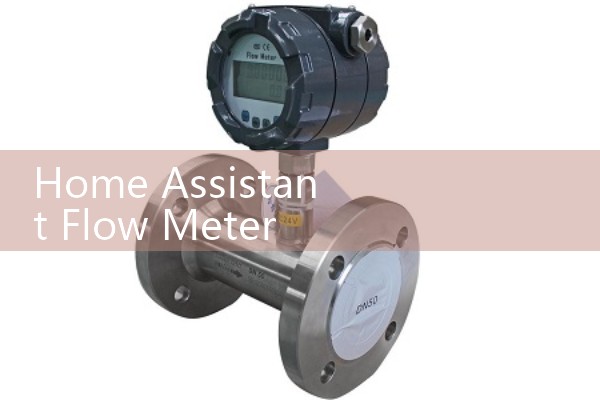
For clean water lines from DN15 to DN50, choose a turbine flow meter such as the Silver Instruments SIL-TUF series. For diesel, fuel oil, or chemicals, an oval gear flow meter such as the SIL-OG series gives repeatable pulse output. For conductive water and wastewater, an electromagnetic flow meter such as the SIL-EMG series provides pulse output and 4-20 mA HART together.
Check the pulse constant in the meter data sheet. Common values are 1 pulse per liter, 10 pulses per liter, or 0.05 liters per pulse. A wrong constant changes the total volume and flow rate on the Home Assistant dashboard. But do not guess this value.
Wiring the Pulse Output to an ESP32
Use a dev board with a free GPIO pin. For a NPN open collector output, connect a 4.7 kΩ resistor from the signal wire to 3.3 V. For a reed switch output, use a 10 kΩ pull-up resistor. Add a 0.1 µF capacitor across signal and ground if the reading jumps.
Most engineers skip this part and damage the board. Do not send a 24 V pulse signal into a 3.3 V GPIO. Use a voltage divider or an optocoupler when the pulse level is higher than the board logic. Keep signal cables away from pump motor cables on runs over 10 meters.
ESPHome Pulse Counter Configuration
This is the shortest path from pulse signal to Home Assistant. Flash ESPHome on the ESP32 and add a pulse counter sensor in YAML.
sensor:
  - platform: pulse_counter
    pin: GPIO13
    name: Bore Water Flow
    unit_of_measurement: L/min
    count_mode:
      rising_edge: DISABLE
      falling_edge: ENABLE
    total:
      name: Bore Water Total
      unit_of_measurement: L
    filters:
      - multiply: 0.5
Set the multiply filter to liters per pulse. If your meter gives one pulse per 2 liters, multiply is 0.5. If your meter gives 10 pulses per liter, multiply is 0.1. So test
For Home Assistant without ESPHome, publish pulse counts from a small Python script or an MQTT bridge. In practice, ESPHome is cleaner. The pulse counter total device saves to flash memory and restores after a power cut.
Common Field Problems and Fixes
Pulse bounce is the biggest issue. A reed switch can register several pulses on one rotation. Use a debounce filter or a small capacitor across the signal and ground. Another common problem is the wrong pulse constant. We have seen a customer in Vietnam report a flow rate that was 10 times too high because the meter sent 10 pulses per liter and the dashboard used liters per pulse.
A paint manufacturer in Southeast Asia used a Silver Instruments oval gear meter on a 1000 liter solvent tank. The meter pulse output went to an ESP32 inside a small enclosure. Home Assistant tracked daily solvent use and sent a Telegram alert when the tank level dropped below 200 liters. The pulse constant was 0.05 liters per pulse. They verified it with a 5 liter measuring can.
FAQ: Home Assistant Flow Meter Pulse Counter Questions
Can I connect a 4-20 mA flow meter directly to Home Assistant?
Not directly. Home Assistant does not read 4-20 mA signals. Use an automation controller such as an ESP32 with an ADC module, or choose a flow meter with pulse output. Many Silver Instruments electromagnetic flow meters include both pulse output and 4-20 mA HART.
Which flow meter is best for a home water line?
For DN15 to DN50 clean water, a turbine flow meter with pulse output is the low cost choice. For bore water with sand or hard particles, use an electromagnetic flow meter. Send us your pipe size in DN, pressure in bar, and flow range in L/min.
How do I convert pulses per liter to a multiply filter?
Multiply is the liters per pulse. If the meter gives 400 pulses per liter, multiply is 0.0025. If the meter gives 0.25 liter per pulse, multiply is 0.25. Put that value in the ESPHome filters section.
Can Home Assistant keep total volume after a power cut?
Yes. ESPHome stores the total pulse count in flash memory. The pulse counter total device restores from the last saved value. Use a stable power supply. For solar sites, add a small UPS or use the ESP32 deep sleep mode with care.
What if I need diesel flow monitoring for a generator?
Use an oval gear flow meter from Silver Instruments. Specify the flow range and fuel line size in DN. For a 20 kW to 100 kW generator, a DN10 or DN15 meter often works. The pulse output connects to the same ESPHome pulse counter setup.
Contact Silver Automation Instruments
Tell us your fluid, pipe size in DN, pressure in bar, temperature in °C, and flow range. We recommend a pulse output flow meter that matches your Home Assistant setup. Tel: +86-25-68650347. WhatsApp: +86-25-52155837. WeChat: +86 15365082610.
 Hot Product
 Related AD